Everything an SMM panel needs, already stocked.
Nine parts, one system. Choose any part to see what it does, why it sits where it does and what it connects to — then read each one below, with the real screens.
Where you set prices, watch orders and money, and run the panel.
Why it sits here: At the top of the inner ring: it is where you work every day.
Connects to: Payments, Supply, Help & migration.
Read about Admin ↓Your customers find, pay and track — in your brand.
A storefront on your own address, built for phones first: search, quality tiers with real delivery rates, the store wallet and live order status.
- FindSearch 8,500+ services by platform and type.
- Choose a qualityBudget, Standard or Premium, each with its recent delivery rate.
- PayFrom their store wallet, at your price.
- TrackLive status; codes and credentials appear in the order.
A merchant’s storefront on a phone — the public demo store

A merchant’s storefront — the public demo store, Royal blue preset
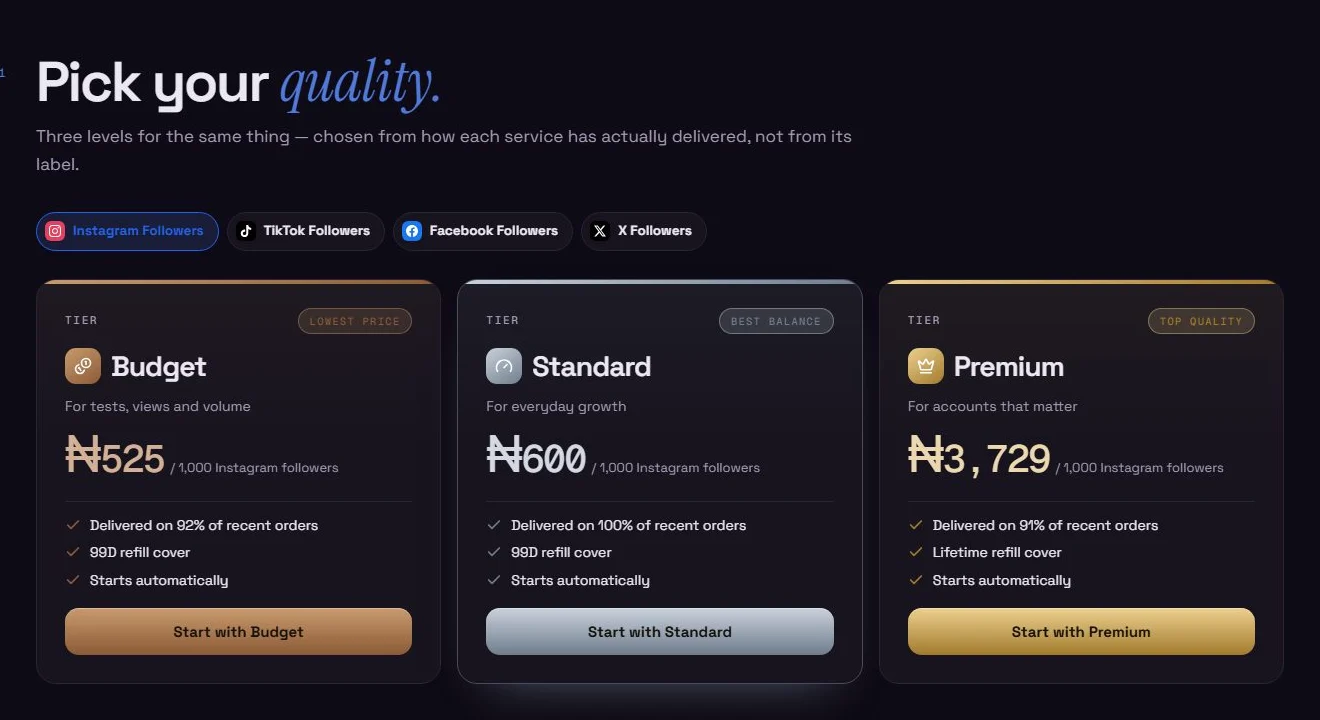
Quality tiers they can trust
- Budget, Standard and Premium for the same service
- Each tier shows its real recent delivery rate
- Prices at your markup
Run it from one place.
Your admin — demo panel, sample data
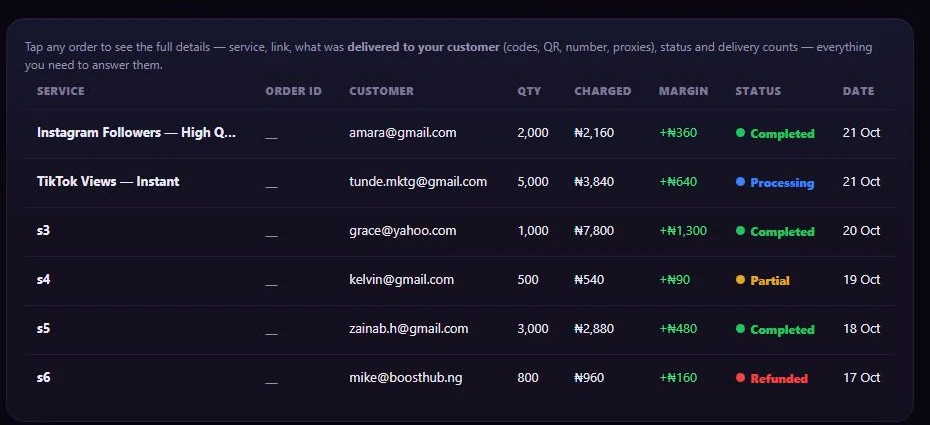
Charge, margin and status
- Charged and margin on every order
- Held orders wait for your top-up, then go
- Re-check a stuck order
The standard panel API — free for every customer.
Every customer gets a key, on every plan. Resellers and their software place orders exactly as in your storefront, at your price.
Charges the customer’s store wallet at your price and sends the order. Returns the order reference.
{
  "key": "msk_••••••",
  "action": "add",
  "service": "…",
  "link": "https://instagram.com/…",
  "quantity": 1000
}{
"order": "…"
}Customers pay you. Directly.
Every top-up goes through the gateway you connect and settles to your account. It becomes store credit only after the provider confirms it.
- CustomerPays ₦5,000Card, transfer or crypto, through the gateway you connected.
- Your gatewaySettles to your accountLess the gateway’s own fee. mysocials never holds this money.
- mysocialsConfirms with the providerThe top-up counts only after the provider confirms it.
- Customer’s store walletShows ₦5,000 creditTheir credit, spent in your store. Not your profit until they buy.
- FlutterwaveCards, transfer
- PaystackCards, transfer
- KorapayIndividuals can sign up
- CryptomusCrypto
- PocketFiBank transfer account
- Bank transferReceipt you approve
8,500+ SMM services and 10 more product lines, on every plan.
The built-in catalogue is stocked from the day you open; your master balance pays each order’s supplier cost as it is sent. On Pro (₦20,000 per 30 days), add other panels’ APIs as your own providers and sell their services beside it.
Your admin — demo panel (cost table not shown)
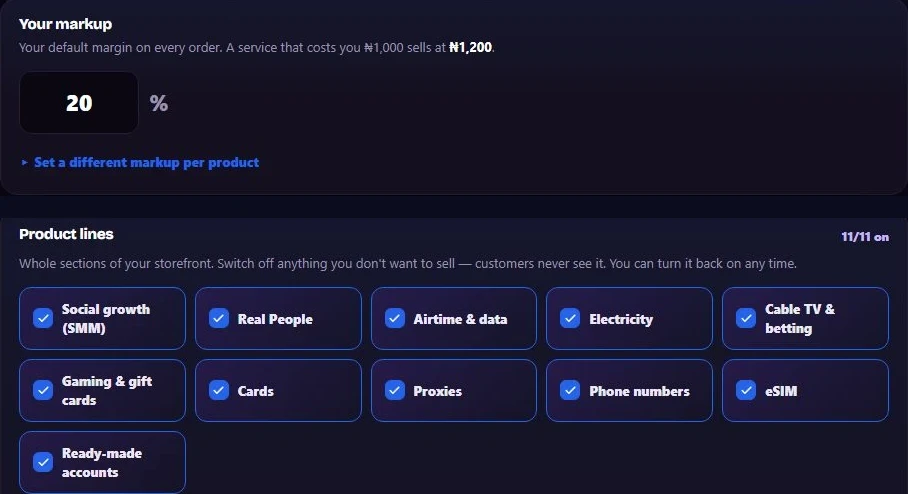
Every line on or off, at your markup
- One markup, or one per product line
- All 11 product lines, each on or off
- Customers never see your cost
Orders send, update, wait and refund on their own.
Choose a state to see when it happens and what happens to each balance — on the built-in supply, for a sample ₦1,200 order.
Your master balance paid the supplier cost and the order was sent. Its status and progress update without anyone pressing a button.
- Customer’s store wallet
- −₦1,200Charged at your price.
- Your master wallet
- −₦1,000Supplier cost, paid to mysocials.
- Your gateway account
- unchangedHolds the customer’s original payment.
Five looks. Any colour. Your name.
Every storefront takes your logo, banner, colours and home-page text, on one of five looks — and your own domain on every plan.
A merchant’s storefront — the public demo store as “Zuri Boost”, Glass look (sample name)

Glass — one of five looks. Each takes your own colour, logo, banner and text; these renders use sample names on the public demo store.
Customers who sell under you — and messages that bring buyers back.
- Your panel
- Your customers
- Their stores on mystore.social
- Their customers
Your admin — demo panel, sample data
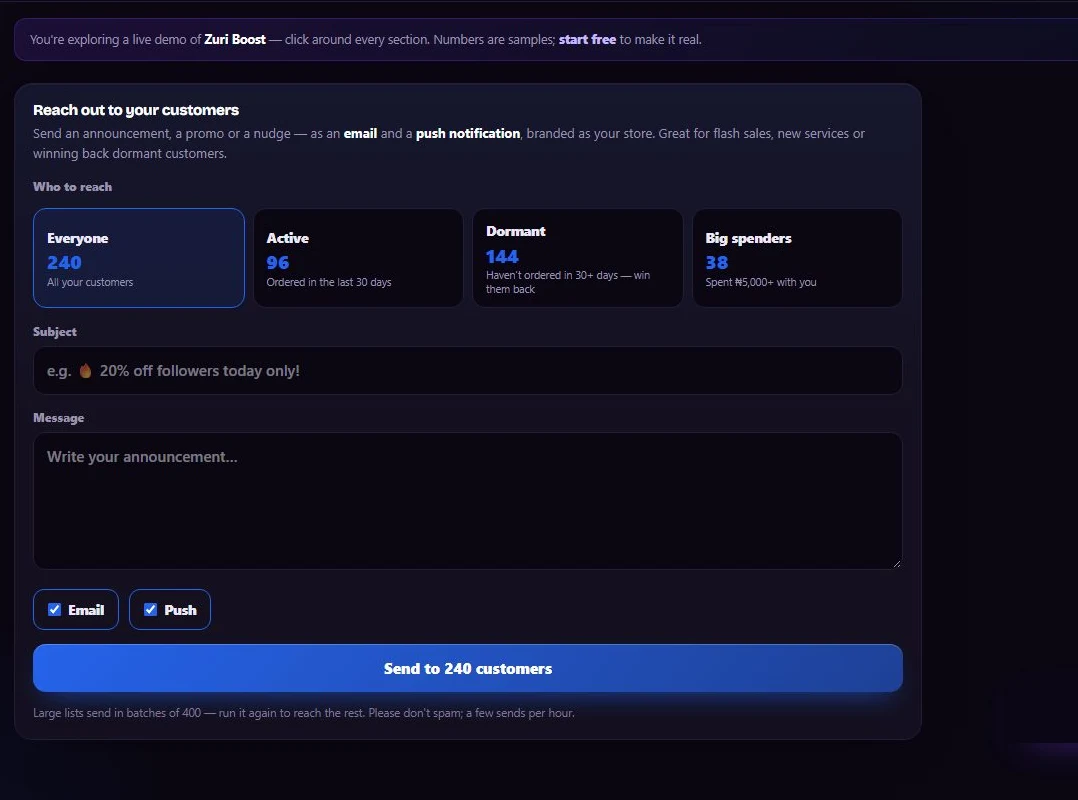
Messages to a segment
- Everyone, active, quiet or big spenders
- By email and push
- Coupons and flash sales to go with them
Help inside your admin — and a self-serve move from another panel.
- How-to guideEvery part of the admin explained, inside your panel.
- Illustrated setup guideFrom an empty shop to the first sale, a picture for every screen.
- AI assistantAsk about your orders, payments and earnings in plain words.
- RequestsMessage the mysocials team from your admin.
- API referenceEvery store carries its own API page for your customers.
- Health monitorSetup gaps and stuck orders flagged, with a morning digest.